


Multiplayer is a core feature of Elden Ring Nightreign, and the name selected when starting the game appears to others in your party. Players can opt to show either their chosen in-game name or their online ID, depending on their preference.
In Elden Ring Nightreign, the player name is the unique identifier chosen at account creation, with minimal restrictions on what it can be. Unlike other FromSoftware titles where names are fixed, this game allows players to update their name as often as desired. To do this, access the Roundtable Hold and follow these steps:
- Navigate to the settings menu and select the System tab, located furthest to the left.
- Scroll to the globe icon and choose Network.
- Find the Player Name option, select it, and use the on-screen keyboard to enter a new name.
This process can be repeated anytime, allowing players to tweak their name to suit their current character or preferences without limitations.
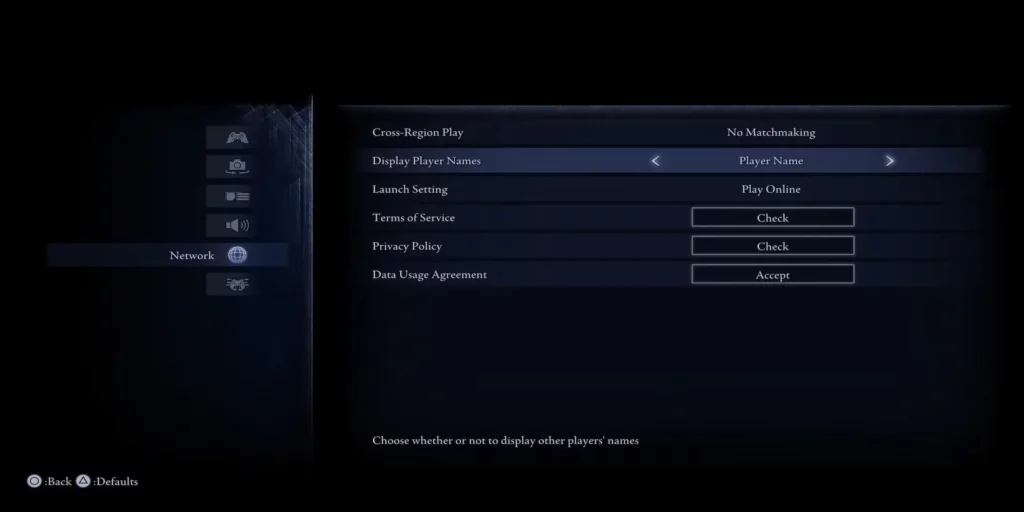
Choosing Between Player Names and Online IDs
Players have the option to display their online ID instead of their in-game name, which shows the username tied to their console account. To make this change, follow a similar process in the Roundtable Hold:
- Go to the settings menu, select the System tab, and navigate to Network.
- Locate the third option, Display Player Names, and toggle it to show online IDs.
This setting can also be adjusted from the main menu before starting the game. Switching to online IDs doesn’t affect gameplay but makes it easier to connect with teammates through the console’s system. Since Elden Ring Nightreign, priced at $59.99, lacks in-game chat, players rely on pings for communication during expeditions unless playing with known friends. After an expedition, players can select a teammate’s account to retrieve their online ID, enabling future group play if both agree.