ASUS’s ROG Matrix 800W BIOS Transforms GeForce RTX 5090 GPUs from Gigabyte, PNY, & MSI with Incredible Clock Speeds
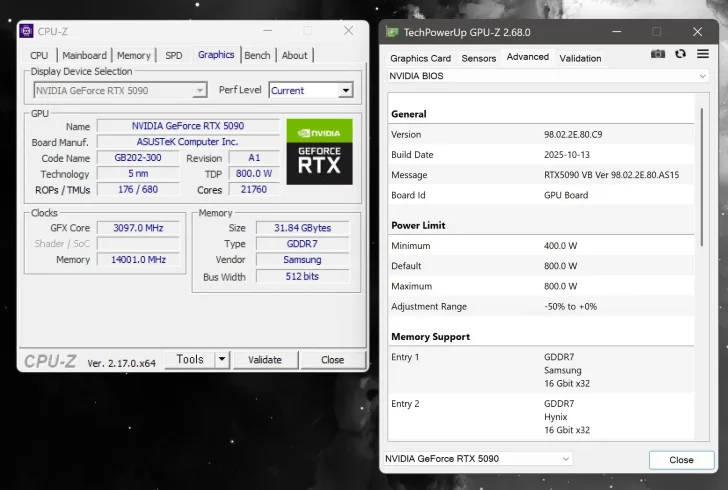
The excitement surrounding ASUS’s groundbreaking 800W XOC BIOS for the ROG Matrix RTX 5090 has reached new heights as this powerful update is now being successfully applied to custom card designs from various manufacturers. This move is transforming the landscape for non-ROG Matrix RTX 5090 GPU owners, enabling enhanced performance capabilities without the need for complex hardware modifications.
NVIDIA GeForce RTX 5090s Amplified with ASUS’s 800W XOC BIOS
Initially introduced in August, the ASUS ROG Matrix GeForce RTX 5090 graphics card stands out with its stunning Matrix theme and innovative quad-fan design. The card’s defining feature, its 800W XOC BIOS, allows for an impressive 323 MHz clock boost. Despite its hefty $4000 US price tag, enthusiasts with other RTX 5090 models are eagerly embracing this BIOS to push their GPUs to new limits.
The Overclock.net forums are abuzz with users sharing their success stories of flashing the ASUS BIOS onto GPUs from brands like Gigabyte, PNY, and MSI. Several models, including the AORUS GeForce RTX 5090 Xtreme Waterforce WB, Gigabyte Master RTX 5090, Palit RTX 5090, MSI RTX 5090 Ventus, and PNY’s RTX 5090 ARGB, have all been successfully upgraded with the BIOS.
However, not all RTX 5090 models are compatible. Cards like the ASUS Astral Air/LC, ASUS TUF, and MSI SUPRIM Liquid have encountered issues, likely due to differences in fan header configurations. Reports suggest that the Matrix’s triple fan header setup is crucial for ensuring compatibility with the 800W XOC BIOS.
Power and Performance: A Delicate Balance
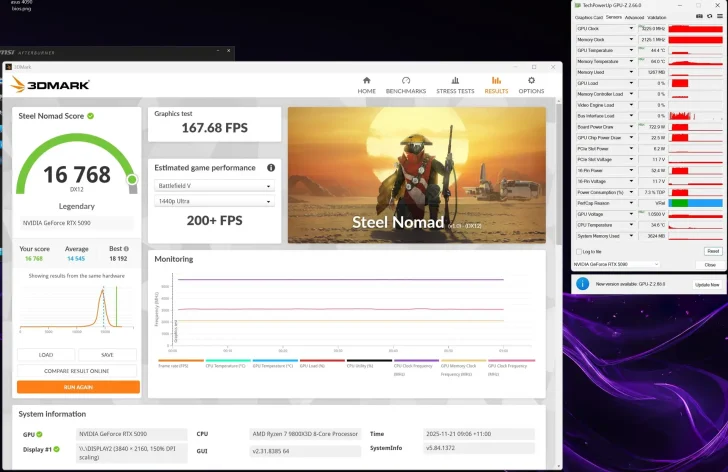
Users experimenting with the new BIOS are witnessing significant performance boosts, with higher clock speeds and increased power consumption. However, this comes with a caveat: the 16-pin power connector, notorious for causing issues on the RTX 5090 and RTX 4090, may be pushed to its limits under these conditions.
Performance data shared by users reveals impressive results in demanding games like Cyberpunk 2077. The BIOS enables substantial overclocking of the core and memory, enhancing the gaming experience but requiring careful power management.
With these kinds of power and performance enhancements on the table, it’s no surprise that more users are looking to upgrade their BIOS. However, caution is advised when flashing a BIOS from a different manufacturer, as there is potential for adverse effects or even hardware damage.
For those willing to take the plunge, the 800W XOC BIOS is available for download, along with a detailed guide for flashing the BIOS. Proceed with care to ensure your graphics card remains in optimal condition.